
Proposals & Quotes
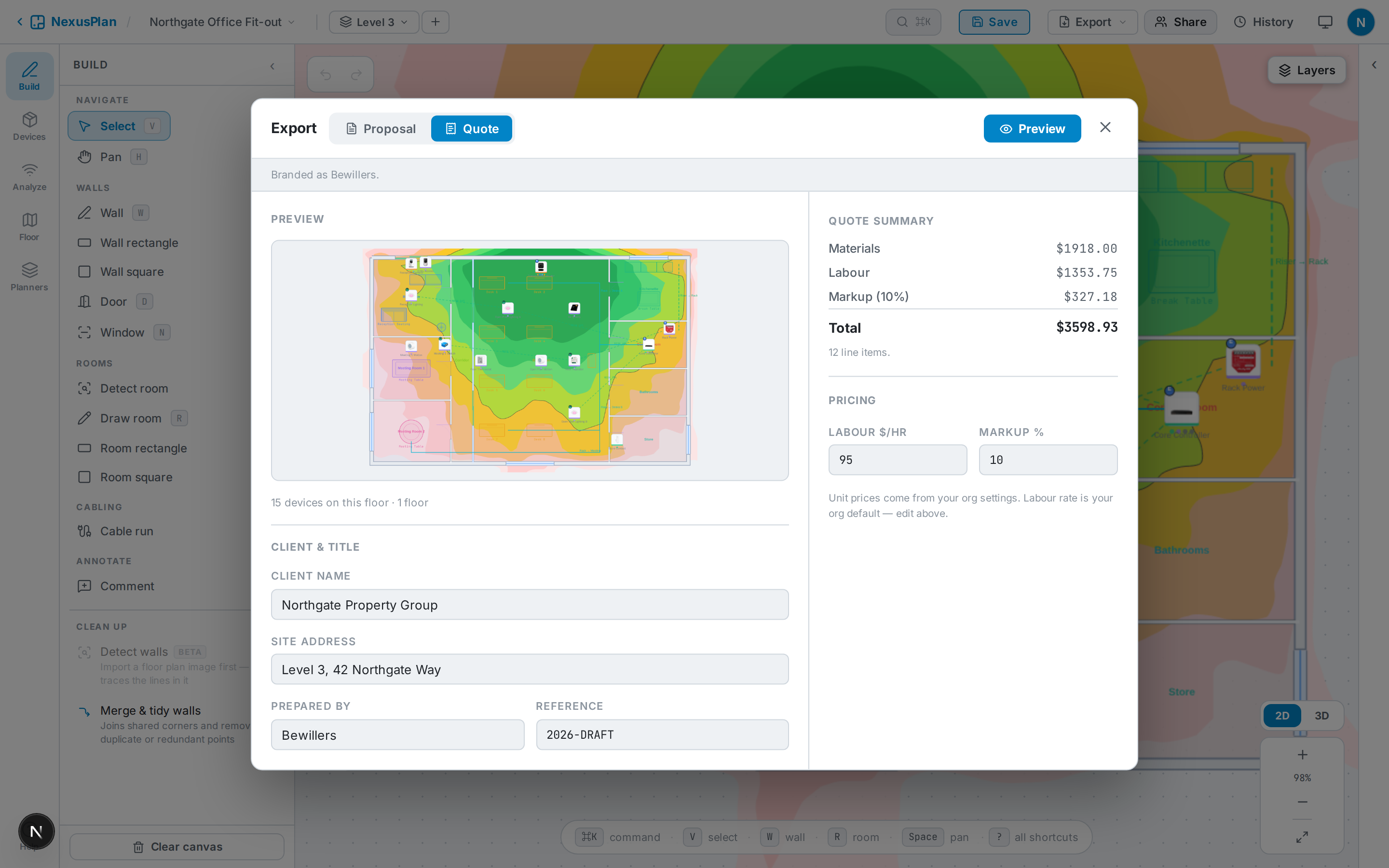
Open Export to produce a document. There are two types.
Proposal
Section titled “Proposal”A client-ready plan set — a cover page plus the pages you choose: floor plans, coverage heatmaps, 3D visualisation, device and cabling schedules, network topology, home-theatre and acoustic reports, plan health, and an optional quotation page.
A priced document — bill of materials and labour with totals, ready to send. Materials and labour rates come from your organisation settings; you can export it as a PDF or CSV.
The flow
Section titled “The flow”- Pick Proposal or Quote and select what to include.
- Client name, site address, prepared-by, and rates auto-fill from the project and your org settings — edit anything you like.
- Click Preview. Capturing the floor and 3D views happens behind a loading screen, then the finished document appears in an in-app preview.
- Print / Save as PDF (or download PNG / CSV) from the preview.
Branding
Section titled “Branding”On Pro Team, quotes and proposals name your company and carry its details, terms and payment terms. Business adds your own branding: your logo, tagline, and the header and footer layout set under Organisation → Branding — on documents and on share links. Without an organisation, documents carry NexusPlan branding. Priced quotes, with labour and markup, come with Pro Team and Business. See Plans & capabilities.